Let your AI agent read your Flutter app's HTTP calls and logs with crumbs
- published
- reading
- 7 min
- author
- Anılcan Çakır
- lang
- en tr
- format
- markdown
crumbs records a running Flutter app's HTTP requests with their response bodies, its logs and its exceptions, and Claude Code, Cursor or Codex read them over MCP. Here the agent finds why a product list is empty although the API answered 200, without a screenshot or a pasted stack trace.
On this page
Today, I'll show you how to let your AI agent read what your Flutter app just did: the HTTP requests it sent, the bodies the server sent back, its logs and its exceptions. No proxy, no DevTools tab, no stack trace pasted into the chat.
Flutter 3.50 was announced on 11 November with official agent plugins, and one of their rules hot reloads or restarts the app every time the agent edits a file under lib/. A reload tells the agent the code compiled. A screenshot tells it what the screen shows. Neither tells it what the server answered. So when a list comes up empty, my loop used to be: open the network tab, copy the response, paste it into the chat, then paste the parsing code too, and ask why the list is empty.
crumbs moves that step to the agent. It records what the app does while it runs, and Claude Code, Cursor or Codex read it over MCP. It's my open source package, and there is a catch, which I'll be honest about near the end.
What you'll walk away with:
- crumbs installed in a Flutter app and wired into your agent
- A small
httpclient that puts every request and response body on the record - A real bug: the API answered 200, the screen says "No products yet", and nothing threw
- How the agent finds the cause from two tool calls, and proves the fix with one clean read
Let's start.
Install crumbs#
Two commands:
flutter pub add crumbs
dart run crumbs crumbs:install
crumbs:install adds dowel, the CLI and MCP server crumbs runs on, scaffolds a fast ./bin/dowel launcher, and patches lib/main.dart: it installs crumbs with its exception and debugPrint watchers behind !kReleaseMode. The guard matters. Debug and profile builds carry crumbs, and a release build leaves it out. Without the guard, anyone who reaches the app's VM Service could read every buffer.
Think of crumbs as a flight recorder. It doesn't fly the plane; it records what happened, so you can read it after something goes wrong. Logs from package:logging, uncaught exceptions and, in debug builds, debugPrint output are recorded with no extra code.
Put your HTTP calls on the record#
HTTP is the one place you wire yourself. crumbs doesn't bring an HTTP library, so the app hands each request to CrumbsStore.recordHttp. My example uses package:http and logs with package:logging:
flutter pub add http logging
With package:http, the recording is one small client that wraps the real one:
// lib/crumbs_http_client.dart
import 'dart:convert';
import 'dart:typed_data';

import 'package:crumbs/crumbs.dart';
import 'package:http/http.dart' as http;

/// An [http.BaseClient] that records every request in crumbs' HTTP buffer.
///
/// crumbs drives nothing and ships no HTTP adapter for `package:http`, so the
/// app hands each exchange to [CrumbsStore.recordHttp] itself. crumbs masks
/// credential headers and body keys before the record is buffered.
class CrumbsHttpClient extends http.BaseClient {
  CrumbsHttpClient(this._inner);

  /// The client that does the real network work.
  final http.Client _inner;

  @override
  Future<http.StreamedResponse> send(http.BaseRequest request) async {
    final Stopwatch watch = Stopwatch()..start();
    final http.StreamedResponse response;
    final Uint8List bytes;

    // 1. Read the body once, so both crumbs and the caller get it.
    try {
      response = await _inner.send(request);
      bytes = await response.stream.toBytes();
    } on Object {
      // A request that never got an answer is still worth a record.
      _record(
        request,
        watch,
        statusCode: 0,
      );
      rethrow;
    }

    // 2. Record the exchange as the app saw it.
    _record(
      request,
      watch,
      statusCode: response.statusCode,
      responseBody: utf8.decode(bytes, allowMalformed: true),
    );

    // 3. Hand the caller a fresh stream over the bytes already read.
    return http.StreamedResponse(
      http.ByteStream.fromBytes(bytes),
      response.statusCode,
      contentLength: bytes.length,
      request: request,
      headers: response.headers,
      reasonPhrase: response.reasonPhrase,
    );
  }

  void _record(
    http.BaseRequest request,
    Stopwatch watch, {
    required int statusCode,
    String? responseBody,
  }) {
    CrumbsStore.recordHttp(
      HttpRequestRecord(
        url: request.url.toString(),
        method: request.method,
        statusCode: statusCode,
        durationMs: watch.elapsedMilliseconds,
        isError: statusCode == 0 || statusCode >= 400,
        timestamp: DateTime.now(),
        requestHeaders: request.headers,
        requestBody: request is http.Request ? request.body : null,
        responseBody: responseBody,
      ),
    );
  }
}
It reads the response body once, records the request with its status, duration, headers and body, and gives the caller a fresh stream over the same bytes. A request that fails before its body is read is recorded with status 0, and the error goes on to the caller. Because it holds every body in memory, keep streaming responses and large downloads on a client of their own.
main.dart uses it only when crumbs is there:
// lib/main.dart
import 'package:crumbs/crumbs.dart';
import 'package:flutter/foundation.dart' show kReleaseMode;
import 'package:http/http.dart' as http;
import 'package:material_ui/material_ui.dart';

import 'crumbs_http_client.dart';
import 'products_page.dart';
import 'theme.dart';

void main() {
  WidgetsFlutterBinding.ensureInitialized();

  // Debug and profile builds only: anyone who reaches the VM Service of a build that carries crumbs can read it.
  if (!kReleaseMode) {
    CrumbsPlugin.install();
    CrumbsPlugin.registerWatcher(ExceptionWatcher());
    CrumbsPlugin.registerWatcher(DumpWatcher());
  }

  final http.Client client = kReleaseMode ? http.Client() : CrumbsHttpClient(http.Client());

  runApp(ProductsApp(client: client));
}

/// The demo shop: one screen that lists the catalogue.
class ProductsApp extends StatelessWidget {
  const ProductsApp({
    super.key,
    required this.client,
  });

  final http.Client client;

  @override
  Widget build(BuildContext context) {
    return MaterialApp(
      title: 'Products',
      debugShowCheckedModeBanner: false,
      theme: appTheme,
      home: ProductsPage(repository: ProductRepository(client)),
    );
  }
}
On Dio, the same thing is an interceptor; the crumbs example app has one. On a Magic app you write nothing: more on that below.
Connect your agent#
dart run crumbs mcp:install
It writes the dowel entry into .mcp.json at the project root:
{
  "mcpServers": {
    "dowel": {
      "command": "./bin/dowel",
      "args": ["mcp:serve"],
      "cwd": "."
    }
  }
}
In Claude Code, run /mcp reconnect dowel once. Cursor, Windsurf and Claude Desktop keep the server in their own config file, and the MCP setup page says where for each. The server has to start in the project root. When I asked the server for its tools, it listed ten crumbs_* tools next to dowel's own: crumbs_requests, crumbs_tail, crumbs_exceptions, crumbs_clear and the rest.
The app is started through dowel, so every tool finds the session:
./bin/dowel start --device=chrome
A list that is empty for no reason#
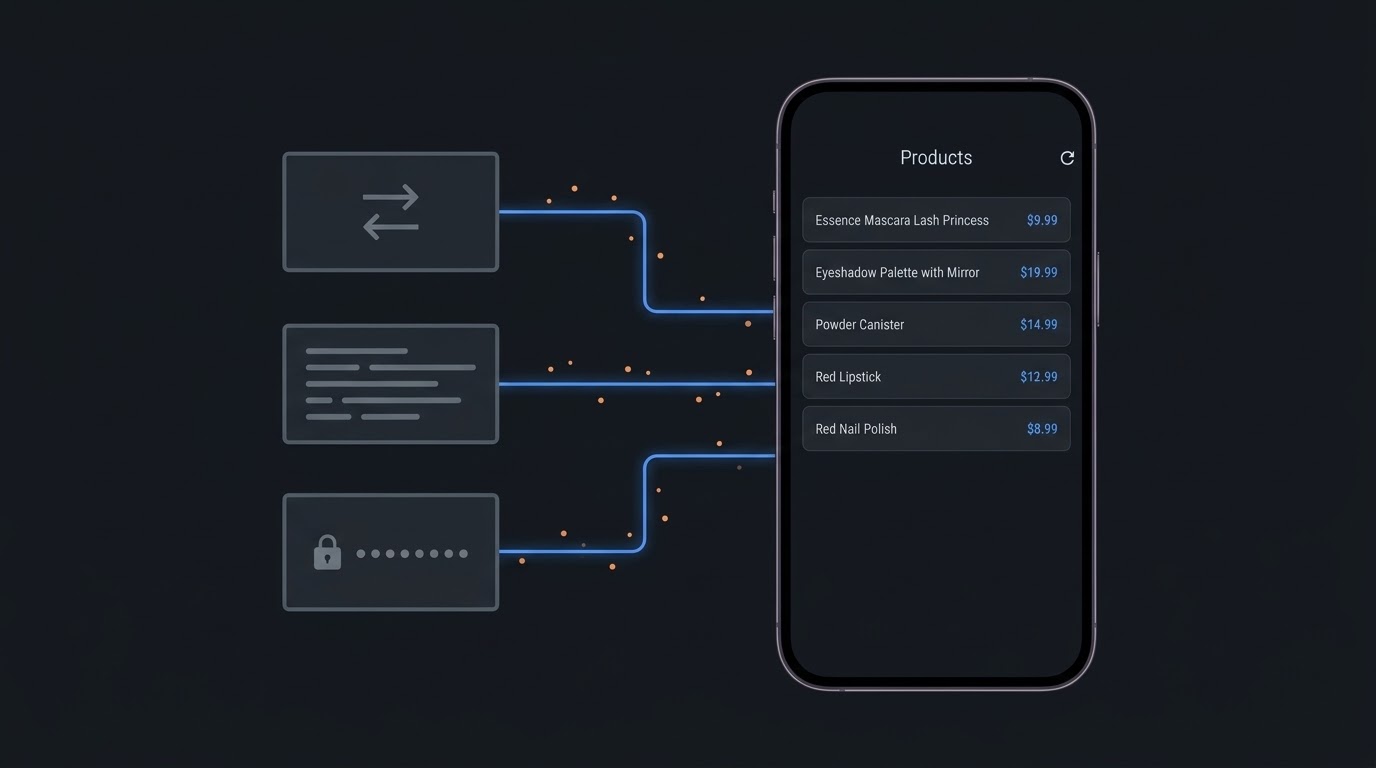
My example is a small shop screen. It loads five products from DummyJSON, a free fake API, and shows them in a list:
GET https://dummyjson.com/products?limit=5&select=title,price
It has one bug I left in on purpose. In a phone-sized window it looks like this:
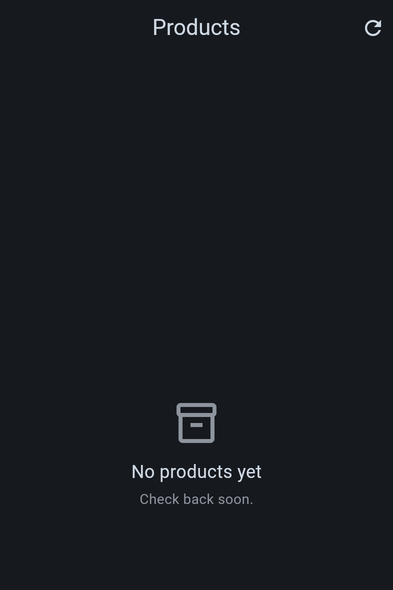
No red screen, no exception in the console. "No products yet" is a polite empty state, and that's the problem: it looks like a real answer. The screenshot can't say whether the server sent nothing, sent an error, or sent five products the app didn't read.
What the agent reads#
The agent asks crumbs for the HTTP traffic first:
crumbs_requests {}
{
  "requests": [
    {
      "url": "https://dummyjson.com/products?limit=5&select=title,price",
      "method": "GET",
      "statusCode": 200,
      "durationMs": 509,
      "isError": false,
      "timestamp": "2026-11-24T20:22:44.637",
      "requestHeaders": {
        "Authorization": "********"
      },
      "requestBody": "",
      "responseBody": "{\"products\":[{\"id\":1,\"title\":\"Essence Mascara Lash Princess\",\"price\":9.99},{\"id\":2,\"title\":\"Eyeshadow Palette with Mirror\",\"price\":19.99},{\"id\":3,\"title\":\"Powder Canister\",\"price\":14.99},{\"id\":4,\"title\":\"Red Lipstick\",\"price\":12.99},{\"id\":5,\"title\":\"Red Nail Polish\",\"price\":8.99}],\"total\":194,\"skip\":0,\"limit\":5}",
      "atUs": 4431899,
      "redacted": false
    }
  ],
  "type": "Response"
}
The server answered 200 in 509 ms with five products. Look at Authorization too: the app sent a bearer token, and crumbs masked it before it was buffered. Credential headers, and body keys and URL parameters with credential names, are hidden by default, with no setup.
Then the logs:
crumbs_tail {"level": "INFO"}
{
  "messages": [
    {
      "level": "INFO",
      "levelValue": 800,
      "message": "Loaded 0 products",
      "loggerName": "products",
      "time": "2026-11-24T20:22:44.643",
      "atUs": 4437899,
      "redacted": false
    }
  ],
  "cursor": 4437899,
  "type": "Response"
}
Five products arrived and the app loaded zero, 6 ms later. crumbs_exceptions returns an empty list, so nothing threw on the way. That leaves the parsing. The repository reads a key the API doesn't send:
final List<dynamic> rows = json['items'] as List<dynamic>? ?? const [];
The body says products, the code says items, and ?? const [] turns the miss into an empty list without a word. The agent found it from two tool calls and the code it already had open. I didn't paste anything.
The fix, and one clean read#
The fix is one word:
final List<dynamic> rows = json['products'] as List<dynamic>? ?? const [];
Here is the whole page with the fix:
// lib/products_page.dart
import 'dart:convert';

import 'package:http/http.dart' as http;
import 'package:logging/logging.dart';
import 'package:material_ui/material_ui.dart';

import 'theme.dart';

/// One row of the catalogue.
@immutable
class Product {
  const Product({
    required this.title,
    required this.price,
  });

  factory Product.fromJson(Map<String, dynamic> json) {
    return Product(
      title: json['title'] as String,
      price: (json['price'] as num).toDouble(),
    );
  }

  final String title;
  final double price;
}

/// Loads the catalogue from the shop API.
class ProductRepository {
  ProductRepository(this._client);

  static final Logger _log = Logger('products');

  final http.Client _client;

  Future<List<Product>> fetch() async {
    final http.Response response = await _client.get(
      Uri.parse('https://dummyjson.com/products?limit=5&select=title,price'),
      headers: {
        'Authorization': 'Bearer demo-token-5f2c9a',
      },
    );
    final Map<String, dynamic> json = jsonDecode(response.body) as Map<String, dynamic>;
    final List<dynamic> rows = json['products'] as List<dynamic>? ?? const [];

    _log.info('Loaded ${rows.length} products');

    return [
      for (final dynamic row in rows) Product.fromJson(row as Map<String, dynamic>),
    ];
  }
}

/// The catalogue screen: a list, or an empty state when there is nothing to sell.
class ProductsPage extends StatefulWidget {
  const ProductsPage({
    super.key,
    required this.repository,
  });

  final ProductRepository repository;

  @override
  State<ProductsPage> createState() => _ProductsPageState();
}

class _ProductsPageState extends State<ProductsPage> {
  late Future<List<Product>> _products = widget.repository.fetch();

  void _reload() {
    setState(() => _products = widget.repository.fetch());
  }

  @override
  Widget build(BuildContext context) {
    return Scaffold(
      appBar: AppBar(
        title: const Text('Products'),
        backgroundColor: surface,
        actions: [
          IconButton(
            tooltip: 'Reload',
            onPressed: _reload,
            icon: const Icon(Icons.refresh),
          ),
        ],
      ),
      body: FutureBuilder<List<Product>>(
        future: _products,
        builder: (BuildContext context, AsyncSnapshot<List<Product>> snapshot) {
          if (snapshot.connectionState != ConnectionState.done) {
            return const Center(child: CircularProgressIndicator());
          }

          final List<Product> products = snapshot.data ?? const [];

          if (products.isEmpty) {
            return const _EmptyState();
          }

          return ListView.separated(
            padding: const EdgeInsets.all(16),
            itemCount: products.length,
            separatorBuilder: (BuildContext context, int index) => const SizedBox(height: 8),
            itemBuilder: (BuildContext context, int index) => _ProductTile(product: products[index]),
          );
        },
      ),
    );
  }
}

class _ProductTile extends StatelessWidget {
  const _ProductTile({required this.product});

  final Product product;

  @override
  Widget build(BuildContext context) {
    return Container(
      padding: const EdgeInsets.symmetric(horizontal: 16, vertical: 14),
      decoration: BoxDecoration(
        color: panel,
        border: Border.all(color: line),
        borderRadius: BorderRadius.circular(8),
      ),
      child: Row(
        children: [
          Expanded(
            child: Text(
              product.title,
              style: const TextStyle(color: ink, fontSize: 15),
            ),
          ),
          Text(
            '\$${product.price.toStringAsFixed(2)}',
            style: const TextStyle(color: accent, fontWeight: FontWeight.w600),
          ),
        ],
      ),
    );
  }
}

class _EmptyState extends StatelessWidget {
  const _EmptyState();

  @override
  Widget build(BuildContext context) {
    return const Center(
      child: Column(
        mainAxisSize: MainAxisSize.min,
        children: [
          Icon(Icons.inventory_2_outlined, size: 48, color: faint),
          SizedBox(height: 12),
          Text('No products yet', style: TextStyle(color: ink, fontSize: 18)),
          SizedBox(height: 4),
          Text('Check back soon.', style: TextStyle(color: faint)),
        ],
      ),
    );
  }
}
The buffers keep the whole run (the newest 500 records each), so an old record can read like a new one. Before it checks a fix, the agent empties them:
crumbs_clear {}
{"cleared": true, "type": "Response"}
Then one tap on Reload, and the next read holds only that action: one request, 200 in 334 ms, and one log line, Loaded 5 products. After a hot restart the buffers start empty as well.
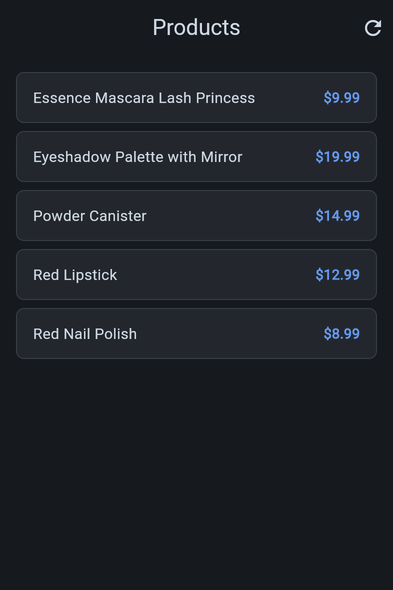
That's the loop I wanted: the agent changes the code, reloads, reads what the app actually did, and only then says it is done. It's a good pair with Tapir, which drives the app. Tapir taps, crumbs tells you what the tap caused.
For humans, the same buffers in the terminal#
Every tool has a command, which is handy when you want to look yourself:
./bin/dowel crumbs:requests
./bin/dowel crumbs:tail
2026-11-24T20:22:44.637 GET https://dummyjson.com/products?limit=5&select=title,price → 200 (509ms) atUs=4431899
2026-11-24T20:22:44.643 [INFO] products: Loaded 0 products
The terminal gives one line per record. The response body is in the MCP answer, which is the one the agent reads.
On a Magic app#
If your app runs on Magic, the full-stack framework for Flutter, you don't need the client above. MagicCrumbsIntegration.install() from magic_devtools records the Http facade's traffic, model, cache, event, gate and query activity, and since magic_devtools 1.1.0, Magic's own Log calls too. When magic_devtools is in your dependencies, crumbs:install wires it for you after Magic.init(). crumbs takes its idea from Laravel Telescope, so if you know that one, you know the shape.
The theme#
The screenshots are dark because the example uses a dark theme in this blog's colours. If you want your copy to look the same, here is the file:
// lib/theme.dart
import 'package:material_ui/material_ui.dart';

const Color surface = Color(0xFF15191F);
const Color panel = Color(0xFF22272E);
const Color line = Color(0xFF373E47);
const Color accent = Color(0xFF539BF5);
const Color ink = Color(0xFFCDD9E5);
const Color faint = Color(0xFF8B949E);
const Color danger = Color(0xFFF47067);

/// A dark theme in the blog's palette, so screenshots sit calmly on a dark page.
final ThemeData appTheme = ThemeData(
  brightness: Brightness.dark,
  scaffoldBackgroundColor: surface,
  colorScheme: const ColorScheme.dark(
    surface: surface,
    primary: accent,
    onPrimary: surface,
    onSurface: ink,
    error: danger,
  ),
  inputDecorationTheme: InputDecorationTheme(
    filled: true,
    fillColor: panel,
    hintStyle: const TextStyle(color: faint),
    labelStyle: const TextStyle(color: faint),
    enabledBorder: OutlineInputBorder(
      borderRadius: BorderRadius.circular(8),
      borderSide: const BorderSide(color: line),
    ),
    focusedBorder: OutlineInputBorder(
      borderRadius: BorderRadius.circular(8),
      borderSide: const BorderSide(color: accent),
    ),
    errorBorder: OutlineInputBorder(
      borderRadius: BorderRadius.circular(8),
      borderSide: const BorderSide(color: danger),
    ),
    focusedErrorBorder: OutlineInputBorder(
      borderRadius: BorderRadius.circular(8),
      borderSide: const BorderSide(color: danger),
    ),
  ),
  filledButtonTheme: FilledButtonThemeData(
    style: FilledButton.styleFrom(
      backgroundColor: accent,
      foregroundColor: surface,
      minimumSize: const Size.fromHeight(48),
      shape: RoundedRectangleBorder(
        borderRadius: BorderRadius.circular(8),
      ),
    ),
  ),
);
Where crumbs is the wrong tool#
- It drives nothing. crumbs only records. Something still has to open the screen and tap: you, or Tapir.
- It records what you wire. Logs, exceptions and, in debug builds,
debugPrintcome for free; HTTP needs the client or interceptor above, so a request made by a client you didn't wrap is not in the buffer. - It is not production monitoring. Debug and profile builds only, in memory, newest 500 records per buffer. Keep Sentry or Crashlytics for your users' devices; crumbs's exception watcher calls the handler that was there before it, so the two can live together.
- Masking goes by name. A header such as
Authorization,CookieorX-Api-Key, or a JSON key or query parameter calledpasswordortoken, is masked for you. A custom header likeX-Auth-Tokenis not, until you add it withCrumbsRedaction.hideRequestHeaders(). A secret written into a log message is recorded as written, unless you setCrumbsRedaction.redactor. - The timeline on disk is native only. Everything above works on the web, but
CrumbsFileSinkneedsdart:io.
Install#
flutter pub add crumbs
dart run crumbs crumbs:install
dart run crumbs mcp:install
The docs, every watcher and the MCP tool reference are on the crumbs page. If your agent reads skills, npx skills add anilcancakir/crumbs teaches it the rules above, such as clearing the buffers before a repro.
That's all. Have a nice day.