Tailwind CSS for Flutter, written by your AI agent: what the wind_kit skill changes
- published
- reading
- 7 min
- author
- Anılcan Çakır
- lang
- en tr
- format
- markdown
wind_kit styles Flutter widgets with Tailwind class strings, and its wind-ui skill teaches Claude Code, Cursor or Codex the rules that differ from web Tailwind. I gave two agents the same pricing page: both pages compiled and looked right, but only the one with the skill showed keyboard focus.
On this page
Today, I'll show you how to let your AI agent write Tailwind-style Flutter UI with wind_kit, and what changes when the agent has the package's own skill. I didn't want to guess, so I gave the same task to two agents and pressed Tab on both results.
Flutter 3.50 was announced on 11 November, and the announcement says package authors can now ship agent skills inside a top-level skills/ directory of their pub.dev packages. The Dart docs give the reason in one line: "Without skills, AI coding agents often guess APIs, suggest deprecated methods, or miss architectural patterns specific to your library." A Tailwind-style package is a good place to test that claim, because your agent already knows Tailwind from the web, and the web is exactly where its habits come from.
wind_kit is my open source package: Tailwind CSS for Flutter. Its skill, wind-ui, is the rule book I give agents for it. There is a catch, and I'll be honest about it near the end.
What you'll walk away with:
- wind_kit in a Flutter app, with a dark theme in one file
- The
wind-uiskill installed for Claude Code, Cursor, Codex or Copilot with one Dart command - The same pricing page written by two agents, one with the skill and one without
- The bug only the run without the skill shipped: keyboard focus nobody can see
Let's start.
Tailwind classes, Flutter widgets#
First, we need to bring the package into our project:
flutter pub add wind_kit material_ui
material_ui is there because Flutter 3.50 deprecates package:flutter/material.dart in favour of the standalone package, so a wind_kit app imports MaterialApp from package:material_ui/material_ui.dart.
wind_kit reads a className string and builds the widget tree from it. A rounded card with a dark variant and a hover shadow is one widget:
WDiv(
  className: 'p-6 mx-4 bg-white dark:bg-gray-800 rounded-xl shadow-lg hover:shadow-xl',
  child: WText('Hello', className: 'text-xl font-bold'),
)
In plain Flutter, the same card is a Container with a BoxDecoration, two BoxShadows and a brightness check, and the hover state needs a StatefulWidget and a MouseRegion on top.
It's not a literal Tailwind port, though. Some web classes have no Wind version: group-hover:, peer-*, backdrop-blur, @apply, negative margins. Wind drops what it can't build, and some drops are silent: text-7xl is past Wind's text-6xl cap, so it does nothing and says nothing. That's fine when you write the class yourself and see the result. It's a trap when an agent writes it from web habits.
A dark theme in one file#
The palette lives in one file, as aliases, so views use short names like bg-panel and text-ink and the hex values stay in one place:
// lib/config/theme.dart
import 'package:material_ui/material_ui.dart';
import 'package:wind_kit/wind_kit.dart';

/// The app's dark palette, kept in one file so views use the short alias names.
///
/// `syncWithSystem: false` keeps the app dark on a machine set to light mode;
/// without it Wind follows the OS brightness on start.
final WindThemeData appTheme = WindThemeData(
  brightness: Brightness.dark,
  syncWithSystem: false,
  aliases: {
    'bg-surface': 'bg-[#15191f]',
    'bg-panel': 'bg-[#22272e]',
    'border-line': 'border-[#373e47]',
    'bg-accent': 'bg-[#539bf5]',
    'bg-accent-hover': 'bg-[#96d0ff]',
    'border-accent': 'border-[#539bf5]',
    'text-accent': 'text-[#539bf5]',
    'text-ink': 'text-[#cdd9e5]',
    'text-soft': 'text-[#adbac7]',
    'text-faint': 'text-[#8b949e]',
    'text-on-accent': 'text-[#15191f]',
  },
);
syncWithSystem: false matters. Without it, Wind follows the OS brightness on start and your dark app turns light on a machine set to light mode.
main.dart wraps the app once, with WindTheme above MaterialApp, so every route and overlay reaches the palette:
// lib/main.dart
import 'package:flutter/foundation.dart' show kReleaseMode;
import 'package:material_ui/material_ui.dart';
import 'package:wind_kit/wind_kit.dart';

import 'config/theme.dart';
import 'pricing_page.dart';

void main() {
  if (!kReleaseMode) {
    Wind.installDebugResolver();
  }

  runApp(const PricingApp());
}

/// Hosts the app under [WindTheme] so every route and overlay reaches the palette.
class PricingApp extends StatelessWidget {
  const PricingApp({super.key});

  @override
  Widget build(BuildContext context) {
    return WindTheme(
      data: appTheme,
      builder: (context, controller) => MaterialApp(
        title: 'Pricing',
        debugShowCheckedModeBanner: false,
        theme: controller.toThemeData(),
        home: const Scaffold(body: PricingPage()),
      ),
    );
  }
}
Install the skill#
The skill lives in the wind_kit repository. Dart's skills CLI installs it, no Node needed:
dart run skills@ add https://github.com/anilcancakir/wind_kit --agent claude --all
Cloning https://github.com/anilcancakir/wind_kit...
Updating https://github.com/anilcancakir/wind_kit...
  [claude] Installed wind-ui
Installed 1 skill(s) for claude at .claude/skills.
--agent also takes cursor, codex, copilot, cline, opencode, antigravity and generic.
The skill is a SKILL.md and nine reference files. Think of it as the house rules you give a new colleague on their first day. They already know how to code; the rules tell them how this house works. A few lines from it:
- Every
bg-,text-,border-,ring-,shadow-andfill-class gets adark:peer in the sameclassName, unless the colour reads the same in both modes. - Conditional styling goes through
states:and prefixed classes likeselected:bg-accent, never Dart string interpolation inside aclassName. - A table of what web Tailwind does and Wind doesn't, so the agent stops writing
group-hover:andtext-7xl. - A definition of done, with this as item three: every interactive surface has
hover:andfocus:states.
Remember that last one. It comes back.
Same prompt, two agents#
Now the test. I made one small app with the theme above, copied it twice, and installed the skill in one copy only. Then I gave Claude Code the same prompt in both, headless, one run each:
This Flutter app uses wind_kit for styling. Build a pricing page in lib/pricing_page.dart
and show it from lib/main.dart in place of the placeholder home.

The page has a heading and a one-line subheading, a Monthly / Yearly toggle, and three
plan cards (Starter, Pro, Team). Each card shows a price, four features with check icons
and a "Choose plan" button. Pro is highlighted as the recommended plan. The cards sit in
one column on a phone and in three columns from 768 px wide.

Use wind_kit className styling and the palette aliases in lib/config/theme.dart. When you
are done, run `flutter analyze` and fix what it reports. Do not run the app.
Both runs finished on their own:
| Without the skill | With the skill | |
|---|---|---|
| What it read first | wind_kit's llms.txt and pages under doc/ in the pub cache |
The wind-ui skill and its widget reference |
| Turns | 13 | 13 |
| Time | 97 s | 91 s |
| Cost | $0.71 | $0.62 |
flutter analyze |
No issues found | No issues found |
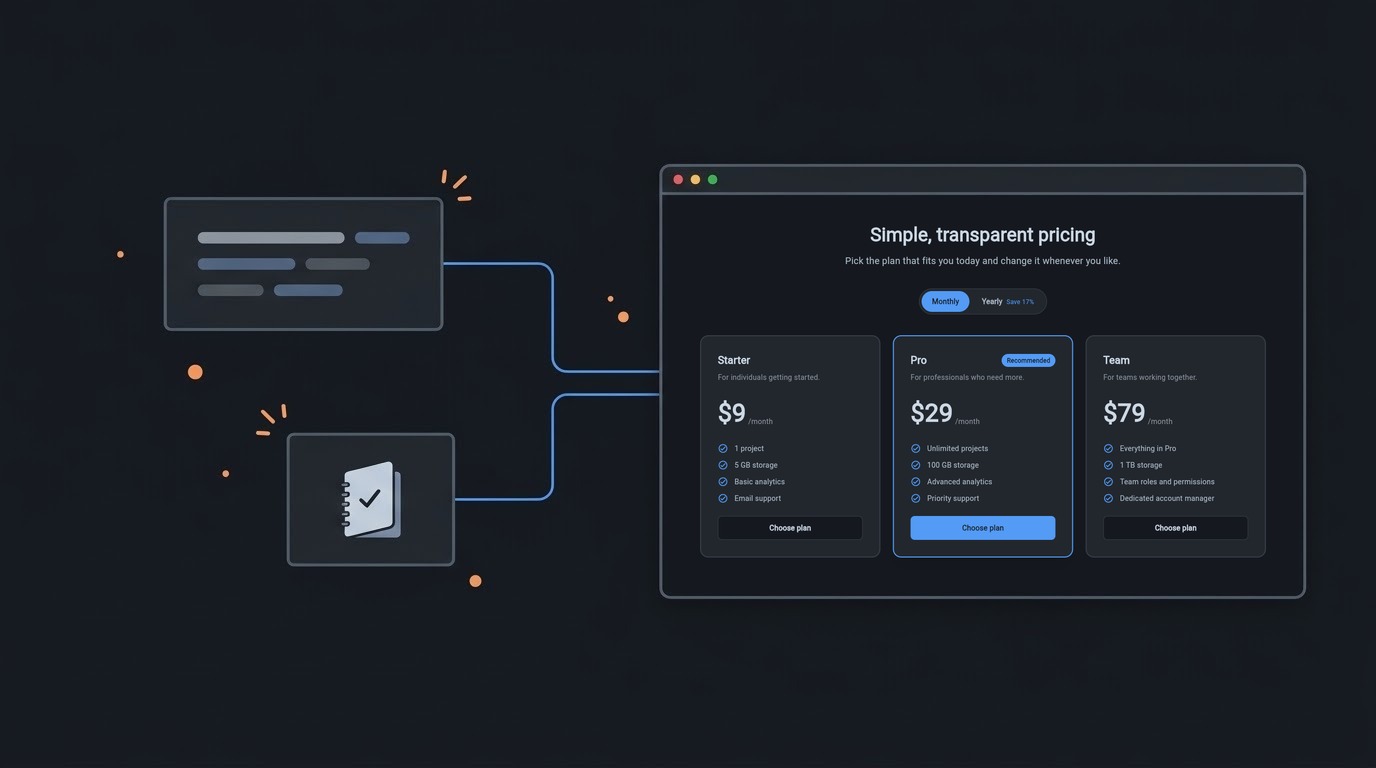
Let's give it a shot. This is the page the agent with the skill wrote, at desktop width:
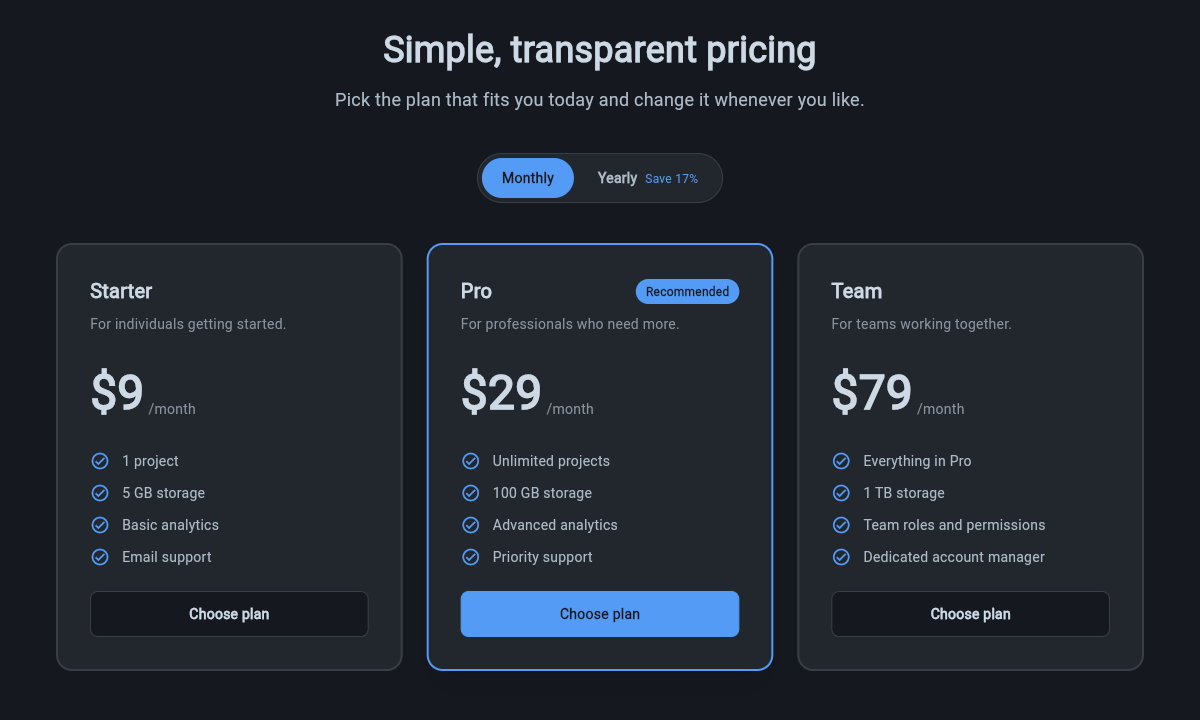
The page from the agent without the skill looks almost the same, and I want to be fair to it: it did a good job. wind_kit ships its llms.txt and its docs inside the package, and the agent found them in the pub cache on its own. Both agents built every styled element from W-widgets, with no Container or Text, both routed the selected plan through states: instead of string interpolation, both set scrollPrimary on the scroll, and neither wrote a dark: peer, for the same reason: the palette is dark only.
So where is the difference? Put the mouse down.
Press Tab#
On the page without the skill, I clicked an empty spot and pressed Tab twice:

Nothing changed. Then I pressed Enter:

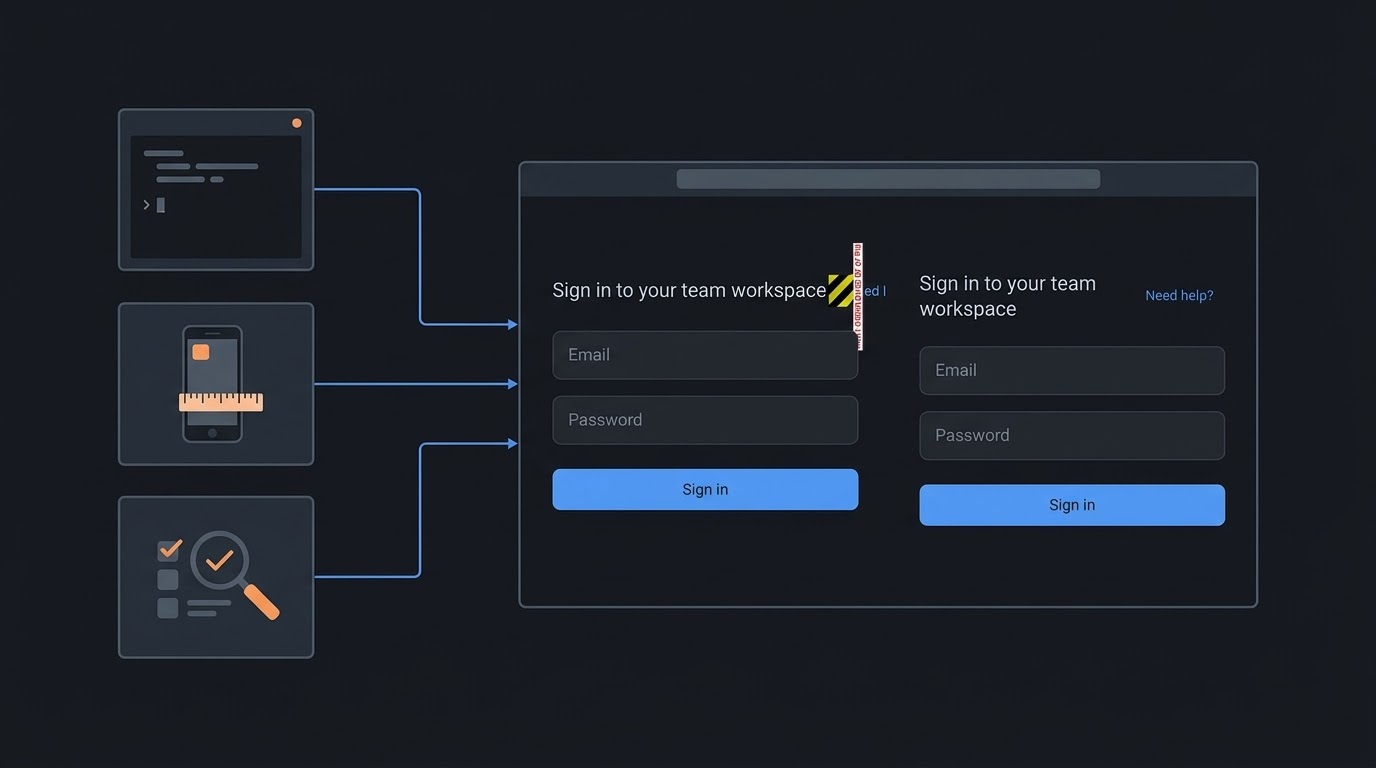
The prices switched to yearly. The focus was on Yearly the whole time, and nothing on the screen said so. For someone who moves through the page with a keyboard, that page is a guessing game.
The same two Tabs on the page with the skill, and Yearly turns into a darker pill:

One more Tab, and the focused "Choose plan" gets an accent border:
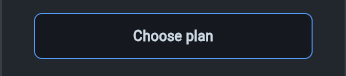
The code shows why. This is the toggle button's className without the skill:
className: 'px-4 py-2 rounded-full selected:bg-accent',
And with it:
className: '''
  flex flex-row items-center gap-2
  px-5 py-2.5 rounded-full
  bg-transparent hover:bg-surface focus:bg-surface
  selected:bg-accent selected:hover:bg-accent-hover selected:focus:bg-accent-hover
  cursor-pointer duration-150 ease-in-out
''',
The first agent did see focus: wind_kit's llms.txt names it as a state you can style, and the button and state pages it opened show focus: classes. None of the pages it read asks for one on every control. The skill makes it item three of its definition of done. That's the whole point of a skill: the docs tell an agent what exists, and the skill tells it what "done" means.
One more difference, at the bottom of the page without the skill:
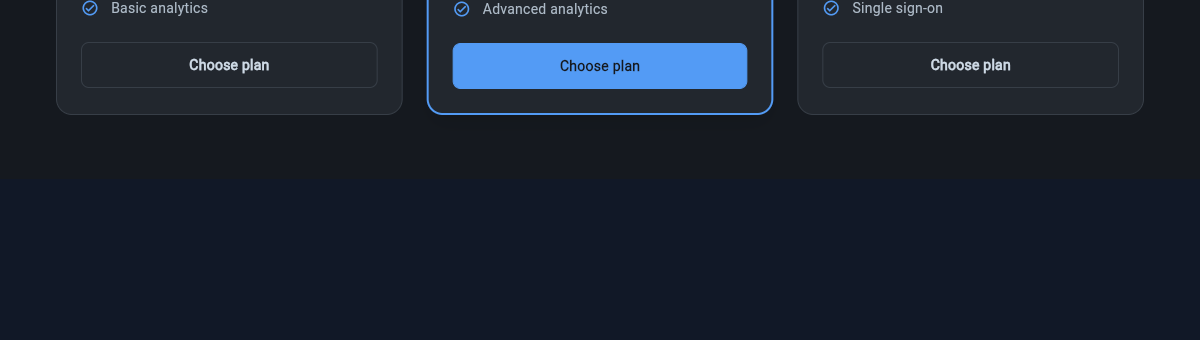
bg-surface sits on the scrolling box, so it ends where the content ends and the Scaffold colour shows under it. The page with the skill paints the background on an outer box and scrolls inside it. I can't tie this one to a single line of the skill; it's simply what this run did.
Here is the whole page the agent wrote with the skill, unchanged apart from the path comment on top:
// lib/pricing_page.dart
import 'package:material_ui/material_ui.dart';
import 'package:wind_kit/wind_kit.dart';

/// Billing period the price toggle switches between.
enum BillingPeriod { monthly, yearly }

/// One plan shown as a card on the pricing page.
class Plan {
  const Plan({
    required this.name,
    required this.description,
    required this.monthlyPrice,
    required this.yearlyPrice,
    required this.features,
    this.recommended = false,
  });

  final String name;
  final String description;
  final int monthlyPrice;
  final int yearlyPrice;
  final List<String> features;
  final bool recommended;

  String priceFor(BillingPeriod period) =>
      '\$${period == BillingPeriod.monthly ? monthlyPrice : yearlyPrice}';
}

const List<Plan> plans = [
  Plan(
    name: 'Starter',
    description: 'For individuals getting started.',
    monthlyPrice: 9,
    yearlyPrice: 90,
    features: ['1 project', '5 GB storage', 'Basic analytics', 'Email support'],
  ),
  Plan(
    name: 'Pro',
    description: 'For professionals who need more.',
    monthlyPrice: 29,
    yearlyPrice: 290,
    recommended: true,
    features: [
      'Unlimited projects',
      '100 GB storage',
      'Advanced analytics',
      'Priority support',
    ],
  ),
  Plan(
    name: 'Team',
    description: 'For teams working together.',
    monthlyPrice: 79,
    yearlyPrice: 790,
    features: [
      'Everything in Pro',
      '1 TB storage',
      'Team roles and permissions',
      'Dedicated account manager',
    ],
  ),
];

/// Pricing page: heading, billing toggle and three plan cards.
///
/// The cards stack on a phone and sit in three columns from `md` (768 px).
class PricingPage extends StatefulWidget {
  const PricingPage({super.key});

  @override
  State<PricingPage> createState() => _PricingPageState();
}

class _PricingPageState extends State<PricingPage> {
  BillingPeriod _period = BillingPeriod.monthly;

  @override
  Widget build(BuildContext context) {
    return WDiv(
      className: 'w-full h-full bg-surface',
      child: SafeArea(
        child: WDiv(
          className: 'w-full h-full overflow-y-auto',
          scrollPrimary: true,
          child: _content(),
        ),
      ),
    );
  }

  Widget _content() {
    return WDiv(
      className: '''
          w-full max-w-6xl mx-auto
          px-4 py-12 md:px-8 md:py-16
          flex flex-col items-center gap-10
        ''',
      children: [
        const WDiv(
          className: 'flex flex-col items-center gap-3',
          children: [
            WText(
              'Simple, transparent pricing',
              className: 'text-3xl md:text-4xl font-bold text-ink text-center',
            ),
            WText(
              'Pick the plan that fits you today and change it whenever you like.',
              className: 'text-base md:text-lg text-soft text-center',
            ),
          ],
        ),
        _BillingToggle(
          period: _period,
          onChanged: (period) => setState(() => _period = period),
        ),
        WDiv(
          className:
              'w-full grid grid-cols-1 md:grid-cols-3 gap-6 items-stretch',
          children: [
            for (final plan in plans) _PlanCard(plan: plan, period: _period),
          ],
        ),
      ],
    );
  }
}

/// Segmented Monthly / Yearly switch.
class _BillingToggle extends StatelessWidget {
  const _BillingToggle({required this.period, required this.onChanged});

  final BillingPeriod period;
  final ValueChanged<BillingPeriod> onChanged;

  @override
  Widget build(BuildContext context) {
    return WDiv(
      className: '''
        flex flex-row items-center gap-1 p-1
        rounded-full border border-line bg-panel
      ''',
      children: [
        _ToggleOption(
          label: 'Monthly',
          selected: period == BillingPeriod.monthly,
          onTap: () => onChanged(BillingPeriod.monthly),
        ),
        _ToggleOption(
          label: 'Yearly',
          badge: 'Save 17%',
          selected: period == BillingPeriod.yearly,
          onTap: () => onChanged(BillingPeriod.yearly),
        ),
      ],
    );
  }
}

class _ToggleOption extends StatelessWidget {
  const _ToggleOption({
    required this.label,
    required this.selected,
    required this.onTap,
    this.badge,
  });

  final String label;
  final String? badge;
  final bool selected;
  final VoidCallback onTap;

  @override
  Widget build(BuildContext context) {
    final states = selected ? const {'selected'} : const <String>{};

    return WButton(
      onTap: onTap,
      states: states,
      className: '''
        flex flex-row items-center gap-2
        px-5 py-2.5 rounded-full
        bg-transparent hover:bg-surface focus:bg-surface
        selected:bg-accent selected:hover:bg-accent-hover selected:focus:bg-accent-hover
        cursor-pointer duration-150 ease-in-out
      ''',
      child: WDiv(
        className: 'flex flex-row items-center gap-2',
        children: [
          WText(
            label,
            states: states,
            className:
                'text-sm font-semibold text-soft selected:text-on-accent',
          ),
          if (badge != null)
            WText(
              badge!,
              states: states,
              className:
                  'text-xs font-medium text-accent selected:text-on-accent',
            ),
        ],
      ),
    );
  }
}

/// A plan card; the recommended plan gets an accent border and a badge.
class _PlanCard extends StatelessWidget {
  const _PlanCard({required this.plan, required this.period});

  final Plan plan;
  final BillingPeriod period;

  @override
  Widget build(BuildContext context) {
    final states = plan.recommended ? const {'recommended'} : const <String>{};

    return WDiv(
      states: states,
      className: '''
        flex flex-col gap-6 p-6 md:p-8
        rounded-2xl border-2 border-line bg-panel
        recommended:border-accent recommended:shadow-xl
      ''',
      children: [
        WDiv(
          className: 'flex flex-col gap-2',
          children: [
            WDiv(
              className: 'flex flex-row items-center justify-between gap-2',
              children: [
                WText(plan.name, className: 'text-xl font-semibold text-ink'),
                if (plan.recommended)
                  const WBadge(
                    'Recommended',
                    className: '''
                      px-2.5 py-1 rounded-full
                      bg-accent text-on-accent font-semibold
                    ''',
                  ),
              ],
            ),
            WText(plan.description, className: 'text-sm text-faint'),
          ],
        ),
        WDiv(
          className: 'flex flex-row items-end gap-1',
          children: [
            WText(
              plan.priceFor(period),
              className: 'text-5xl font-bold text-ink',
            ),
            WDiv(
              className: 'pb-2',
              child: WText(
                period == BillingPeriod.monthly ? '/month' : '/year',
                className: 'text-sm text-faint',
              ),
            ),
          ],
        ),
        WDiv(
          className: 'flex flex-col gap-3',
          children: [
            for (final feature in plan.features)
              WDiv(
                className: 'flex flex-row items-center gap-3',
                children: [
                  const WIcon(
                    Icons.check_circle_outlined,
                    className: 'text-xl text-accent',
                  ),
                  WDiv(
                    className: 'flex-1',
                    child: WText(feature, className: 'text-sm text-soft'),
                  ),
                ],
              ),
          ],
        ),
        WButton(
          onTap: () {},
          states: states,
          className: '''
            w-full flex flex-row justify-center px-4 py-3 rounded-lg
            border border-line bg-surface
            hover:border-accent focus:border-accent
            recommended:border-accent recommended:bg-accent
            recommended:hover:bg-accent-hover recommended:focus:bg-accent-hover
            cursor-pointer duration-150 ease-in-out
          ''',
          child: WText(
            'Choose plan',
            states: states,
            className:
                'text-sm font-semibold text-ink recommended:text-on-accent',
          ),
        ),
      ],
    );
  }
}
The catch#
- One run each. An agent doesn't give the same answer twice, so read this as one honest example, not a benchmark. The agent without the skill could add focus states on its next run, and the one with the skill could miss something else.
- The skill is not a linter. Nothing fails the build when a
focus:class is missing or a class does nothing:flutter analyzewas clean on both pages. You still press Tab yourself, or let an agent drive the app with a tool like Tapir. - wind_kit is a styling engine, not a widget catalogue.
Scaffold,AppBar,showDialogandListView.builderstay Flutter. Agridin Wind is a staticWrap, so a long or growing list still wantsListView.builder. - If your team doesn't think in Tailwind, the class strings are one more language to learn. In that case, my opinion is that plain widgets with a good
ThemeDataare the better call. dart run skills@ getdoesn't install the skill today, for the two reasons in the note above.
Install#
flutter pub add wind_kit material_ui
dart run skills@ add https://github.com/anilcancakir/wind_kit --agent claude --all
Every class, every widget and the theme options are on the wind_kit page.
That's all.